> ## Documentation Index
> Fetch the complete documentation index at: https://agno-v2-agui.mintlify.site/llms.txt
> Use this file to discover all available pages before exploring further.
# Tracing
> Gain deep visibility into your Agno agents with OpenTelemetry-based observability
v2.3.5
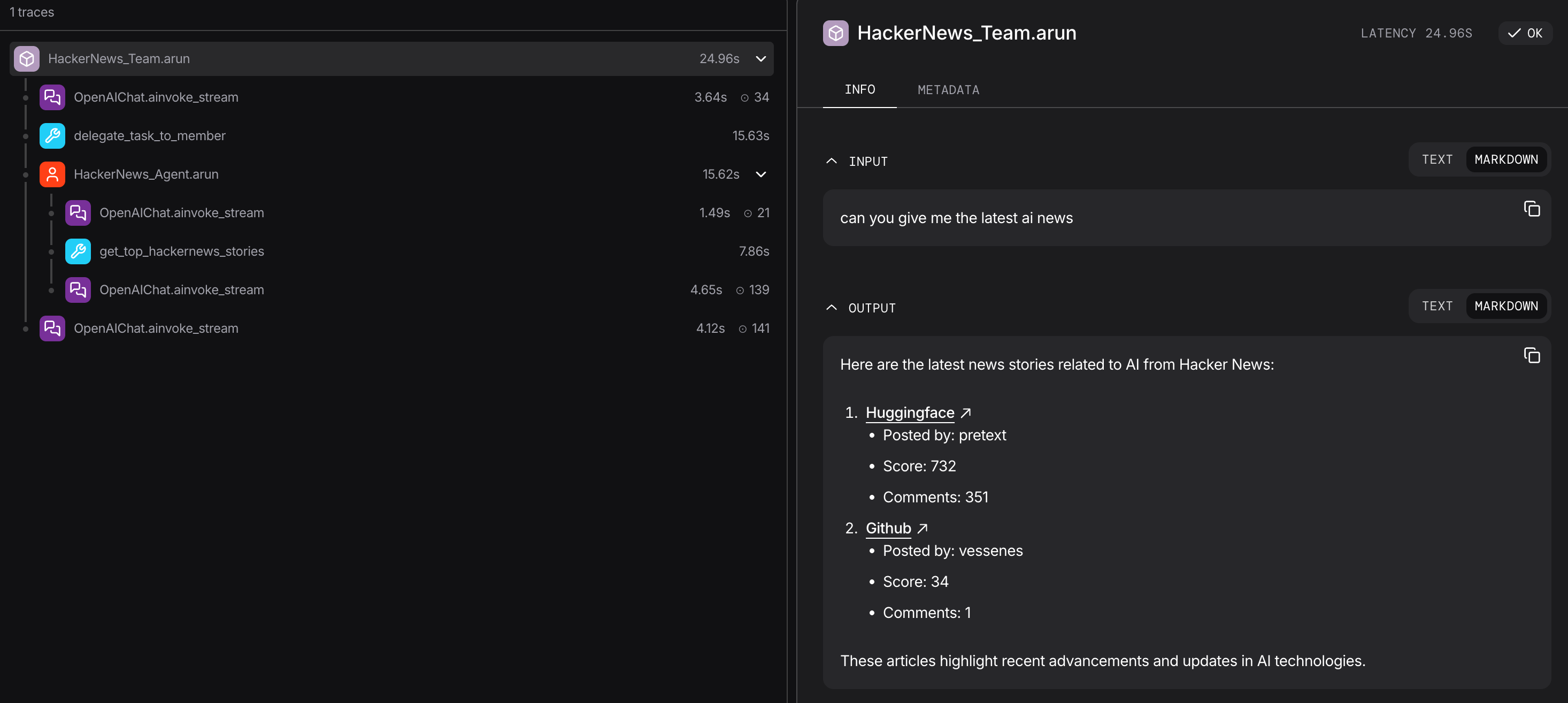
In the systems you build with Agno, agents will make autonomous decisions, interact with external tools, and coordinate with each other in ways that aren't immediately visible from your recorded sessions alone. Observability is key to staying on top of what your agents are doing and how your system is performing.
**Agno Tracing** is the recommended way to introduce observability for your Agno agents, teams, and workflows.
It automatically captures all relevant execution details, helping you understand what your agents are doing, simplifying debugging and helping you optimize your system.
Tracing leverages [OpenTelemetry](https://opentelemetry.io/) to instrument the Agno agents and teams, capturing traces and spans.
 ## Why is Observability Important?
As your Agno system become more complex (Agents using multiple tools, making sequential decisions, and coordinating with other agents), understanding its behavior becomes challenging.
**Agno Tracing** solves this:
* **Debugging**: See exactly what went wrong when an agent fails
* **Performance**: Identify bottlenecks in agent execution
* **Cost Tracking**: Monitor token usage and API calls
* **Behavior Analysis**: Understand decision-making patterns
* **Audit Trail**: Track what agents did and why
All Agno Tracing data is stored in your own database. No tracing data will leave your system, or be sent to third parties: you are in complete control.
## Understanding Traces and Spans
Think of tracing like a family tree for your agent's execution:
### Trace
A **trace** represents one complete agent execution from start to finish. Each trace has a unique `trace_id` that groups all related operations together.
### Span
A **span** is a single operation within that execution. Spans form a parent-child hierarchy:
## Why is Observability Important?
As your Agno system become more complex (Agents using multiple tools, making sequential decisions, and coordinating with other agents), understanding its behavior becomes challenging.
**Agno Tracing** solves this:
* **Debugging**: See exactly what went wrong when an agent fails
* **Performance**: Identify bottlenecks in agent execution
* **Cost Tracking**: Monitor token usage and API calls
* **Behavior Analysis**: Understand decision-making patterns
* **Audit Trail**: Track what agents did and why
All Agno Tracing data is stored in your own database. No tracing data will leave your system, or be sent to third parties: you are in complete control.
## Understanding Traces and Spans
Think of tracing like a family tree for your agent's execution:
### Trace
A **trace** represents one complete agent execution from start to finish. Each trace has a unique `trace_id` that groups all related operations together.
### Span
A **span** is a single operation within that execution. Spans form a parent-child hierarchy:
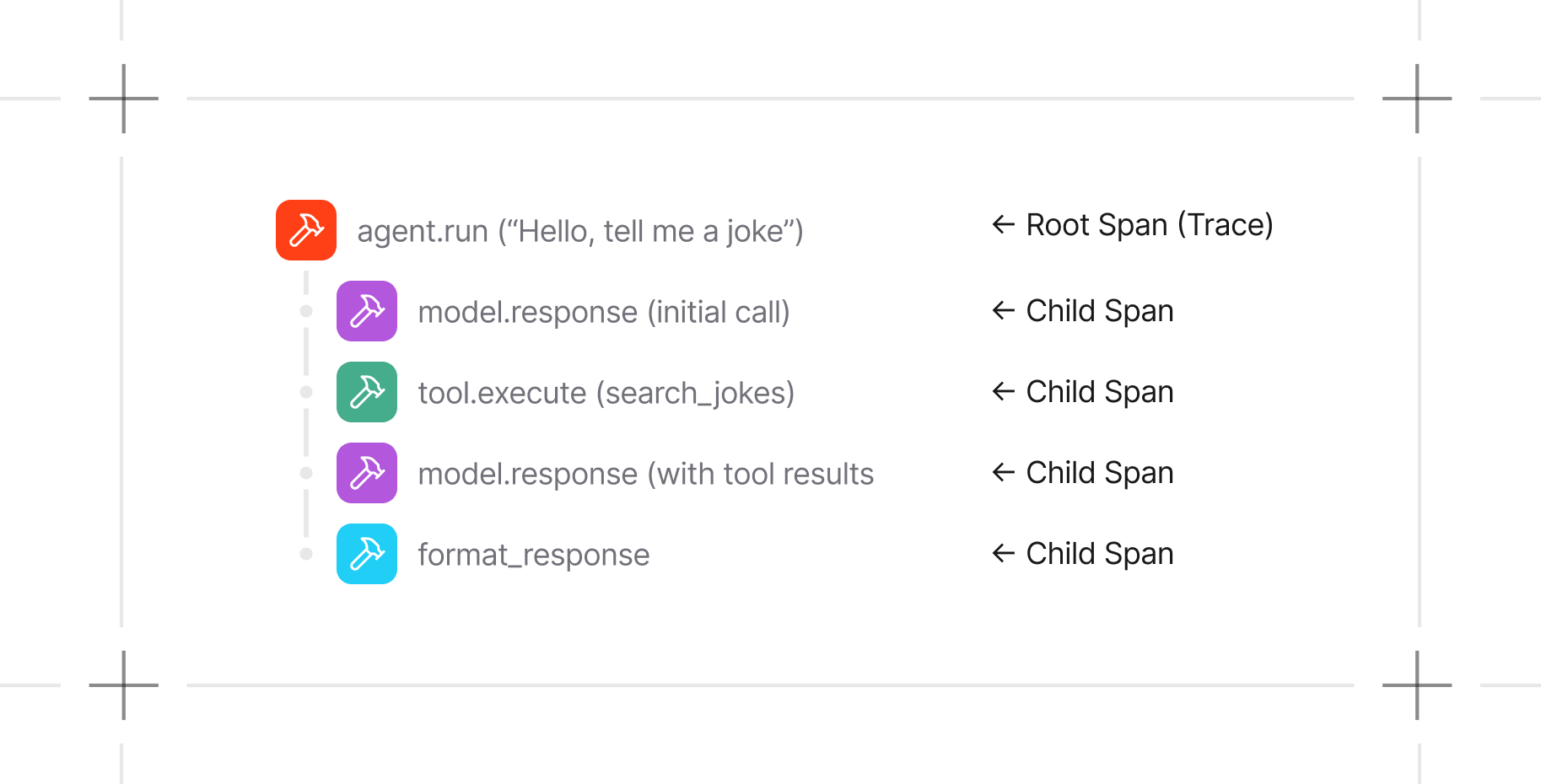
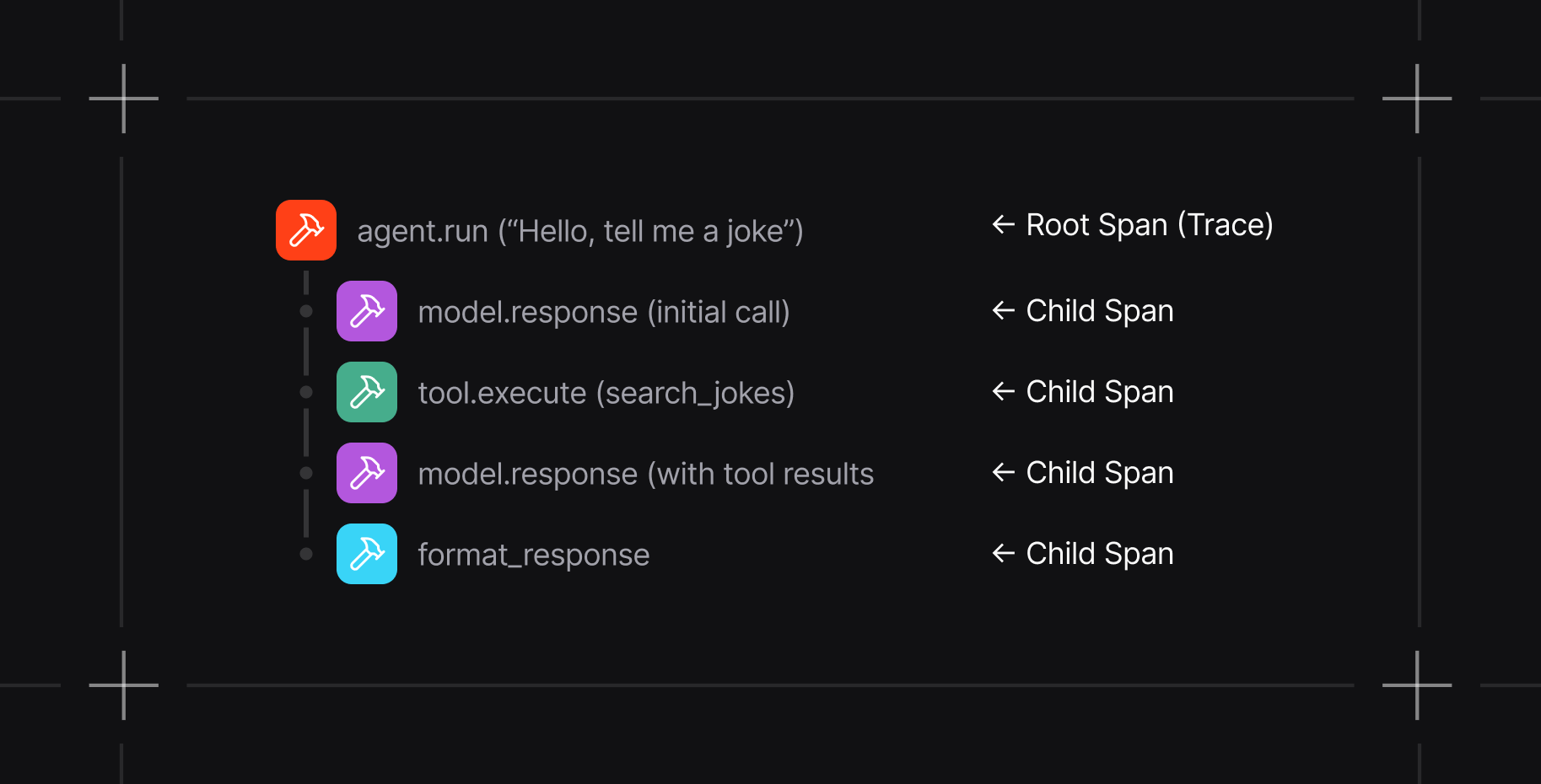 Each span captures:
* **What happened**: Operation name (e.g., `agent.run`, `model.response`)
* **When**: Start and end timestamps
* **Context**: Input arguments, outputs, token usage
* **Relationships**: Parent span, child spans
* **Metadata**: Agent ID, session ID, run ID
## What Gets Traced
Agno automatically captures:
| Operation | What Gets Traced |
| ----------------------- | -------------------------------------------------------------- |
| **Agent Runs** | Every `agent.run()` or `agent.arun()` call with full context |
| **Model Calls** | LLM interactions including prompts, responses, and token usage |
| **Tool Executions** | Tool invocations with arguments and results |
| **Team Operations** | Team coordination and member agent runs |
| **Workflow Operations** | Workflow coordination and step runs |
## Key Features
* **Zero-Code Instrumentation**: No need to modify your agent code
* **Database Storage**: Traces stored in your Agno database (SQLite, PostgreSQL, etc.)
* **Flexible Querying**: Filter by agent, session, run, or time range
* **OpenTelemetry Standard**: Export to external tools like Arize Phoenix, Langfuse
* **Non-Blocking**: Tracing never slows down your agents
* **Configurable**: Adjust batch sizes and processing for your needs
## Quick Start
```bash theme={null}
uv pip install -U opentelemetry-api opentelemetry-sdk openinference-instrumentation-agno
```
```python theme={null}
from agno.tracing import setup_tracing
from agno.db.sqlite import SqliteDb
db = SqliteDb(db_file="tmp/traces.db")
setup_tracing(db=db) # Call this once at startup
```
```python theme={null}
from agno.agent import Agent
from agno.models.openai import OpenAIResponses
agent = Agent(
name="My Agent",
model=OpenAIResponses(id="gpt-5.2"),
instructions="You are a helpful assistant",
)
agent.run("Hello!") # Automatically traced!
```
```python theme={null}
traces, total = db.get_traces(agent_id=agent.id, limit=10)
for trace in traces:
print(f"{trace.name}: {trace.duration_ms}ms")
```
## Guides
Configure and enable tracing
Trace your agents, teams, and workflows in AgentOS
Query traces and spans from your database
Each span captures:
* **What happened**: Operation name (e.g., `agent.run`, `model.response`)
* **When**: Start and end timestamps
* **Context**: Input arguments, outputs, token usage
* **Relationships**: Parent span, child spans
* **Metadata**: Agent ID, session ID, run ID
## What Gets Traced
Agno automatically captures:
| Operation | What Gets Traced |
| ----------------------- | -------------------------------------------------------------- |
| **Agent Runs** | Every `agent.run()` or `agent.arun()` call with full context |
| **Model Calls** | LLM interactions including prompts, responses, and token usage |
| **Tool Executions** | Tool invocations with arguments and results |
| **Team Operations** | Team coordination and member agent runs |
| **Workflow Operations** | Workflow coordination and step runs |
## Key Features
* **Zero-Code Instrumentation**: No need to modify your agent code
* **Database Storage**: Traces stored in your Agno database (SQLite, PostgreSQL, etc.)
* **Flexible Querying**: Filter by agent, session, run, or time range
* **OpenTelemetry Standard**: Export to external tools like Arize Phoenix, Langfuse
* **Non-Blocking**: Tracing never slows down your agents
* **Configurable**: Adjust batch sizes and processing for your needs
## Quick Start
```bash theme={null}
uv pip install -U opentelemetry-api opentelemetry-sdk openinference-instrumentation-agno
```
```python theme={null}
from agno.tracing import setup_tracing
from agno.db.sqlite import SqliteDb
db = SqliteDb(db_file="tmp/traces.db")
setup_tracing(db=db) # Call this once at startup
```
```python theme={null}
from agno.agent import Agent
from agno.models.openai import OpenAIResponses
agent = Agent(
name="My Agent",
model=OpenAIResponses(id="gpt-5.2"),
instructions="You are a helpful assistant",
)
agent.run("Hello!") # Automatically traced!
```
```python theme={null}
traces, total = db.get_traces(agent_id=agent.id, limit=10)
for trace in traces:
print(f"{trace.name}: {trace.duration_ms}ms")
```
## Guides
Configure and enable tracing
Trace your agents, teams, and workflows in AgentOS
Query traces and spans from your database